Intraoral Scanner Challenges: Why the Right Lab Technician Matters
Ever finished an intraoral scanner case and wondered, “Is this scan good enough to send?”
Tight margins. Hard-to-reach areas. Details that don’t look quite as clear as you’d hoped.
Even experienced dentists encounter scanning challenges. And while digital impressions have transformed restorative workflows, they haven’t eliminated every clinical variable.
But here’s a question worth asking:
When your scan isn’t straightforward, who’s reviewing it at the lab?
At Dentlink, every case is matched with a designated master technician whose expertise suits the restoration.
Because when a case requires a closer look, the experience behind the screen matters just as much as the technology in your hands.
Why Even a Good Intraoral Scanner Can Produce Challenging Scans
Today’s intraoral scanners make digital impressions more accessible and efficient. Yet clinical conditions can still affect the quality of captured data.
A 2025 review published in the Journal of Clinical Medicine identified numerous factors influencing intraoral scanning accuracy, including scanner characteristics, clinical conditions, scanning strategies, and operator experience. (Read the clinical review on intraoral scanning accuracy.)
For restorative dentists, these challenges often appear in familiar situations.
Tight or Subgingival Margins
A preparation margin near or below the gingival tissue can be difficult to capture clearly.
Moisture, tissue interference, or limited visibility may leave areas of the finish line uncertain.
The question is whether the digital impression contains enough reliable information for the intended restoration.
Hard-to-Reach Areas
Posterior preparations, restricted access, and challenging patient anatomy can make capturing all necessary surfaces more difficult.
Incomplete or distorted data in critical areas may affect the technician’s ability to design the restoration accurately.
Questionable Bite or Contact Information
Even when the preparation looks acceptable, the opposing arch or bite registration may need additional review.
These details matter because they influence how the technician interprets the case during restoration design.
A less-than-perfect-looking scan doesn’t automatically mean a failed scan. But missing critical information should never be ignored.
What Should Your Dental Lab Do With a Challenging Scan?
When the scan reaches the lab, the next step shouldn’t simply be to proceed with whatever information is available.
The technician needs to evaluate the case.
That may involve reviewing:
- Margin visibility and preparation geometry
- Areas of incomplete or distorted scan data
- Adjacent teeth and opposing dentition
- Bite registration and occlusal relationships
- Material selection and restoration requirements
- Case-specific clinical instructions
The goal is to determine whether the data supports the intended restoration.
An experienced technician may identify details that need closer examination or additional clarification.
And sometimes, the best decision is to request another scan before fabrication begins.
Good lab support isn’t about accepting every scan. It’s about knowing when the case is ready to move forward.
For a detailed guide to evaluating questionable scan data, read Should I Rescan This? What Your Dental Lab Looks for in an Intraoral Scan.
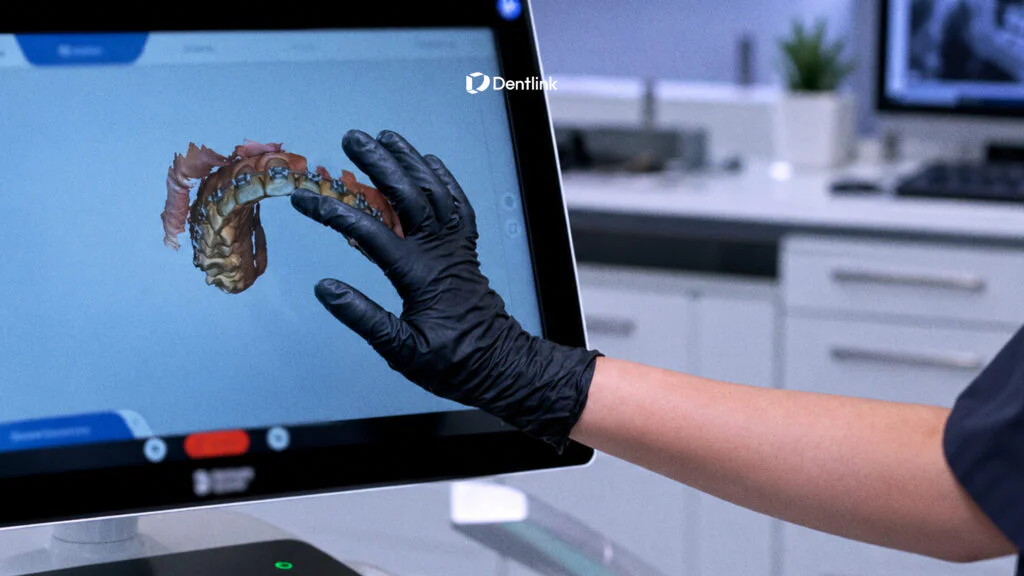
Why Case-Specific Technician Matching Matters
Not every restoration requires the same technical expertise.
An implant crown, an anterior veneer, and a full-arch restoration each present different design and fabrication considerations.
That’s why Dentlink uses a case-specific technician assignment approach.
Every case is matched with a designated master technician whose expertise fits the restoration.
Rather than assigning one technician permanently to every dentist, Dentlink matches the individual case with the appropriate specialist.
This approach helps connect the requirements of the restoration with relevant technical experience.
1. The Right Expertise for the Restoration
Different types of restorations require different technical knowledge.
A technician experienced with implant restorations may focus on considerations that differ from those involved in anterior esthetic work.
Matching the case with appropriate expertise helps ensure that its particular requirements receive informed attention.
2. One Designated Technician Responsible for the Case
Once assigned, the technician takes responsibility for the restoration throughout its production process.
This helps maintain continuity between case review, design, fabrication, and final finishing.
Rather than treating the scan as an isolated digital file, the technician works with the clinical requirements behind it.
3. Direct Communication When Details Need Clarification
Sometimes even an experienced technician needs more information.
A margin may be unclear. A clinical preference may need confirmation. A restoration design may require additional input.
At Dentlink, dentists can communicate with the technician responsible for their case through linkTalk.
This allows questions about the restoration to reach the person actually working on it.
Explore how dental lab communication can help reduce unnecessary chair time.
What Does Your Designated Master Do After Receiving the Scan?
A digital impression is the starting point for a restoration, not the finished product.
Once the necessary information is available, the assigned technician moves through the appropriate digital design and production process.
Reviewing the Clinical Data
The technician evaluates the scan, prescription, and restoration requirements.
If something important appears unclear, the case can be clarified before proceeding.
Applying Expertise During CAD Design
Digital design software provides tools for defining restoration geometry and evaluating details such as margins, contours, and contacts.
But using those tools effectively still requires interpretation and technical judgment.
An experienced technician understands the importance of the underlying clinical information, rather than relying on software to resolve every uncertainty.
Refining the Restoration
Following fabrication, finishing and quality-control steps help ensure the restoration meets its intended specifications.
These processes complement the clinical information provided by the dentist.
Digital tools support the process. Experienced hands bring the details together.
That’s the philosophy behind Dentlink’s Made by Masters approach.
Learn more about how dedicated dental technicians support each restoration.
5 Questions to Ask When Choosing a Digital Dental Lab
If you’re already using an intraoral scanner, choosing the right dental lab involves more than checking whether it accepts your digital files.
Consider asking:
- Who reviews my scan before fabrication? Is an experienced technician evaluating the clinical information?
- How do you handle questionable scan details? Will the lab identify areas needing clarification rather than make unsupported assumptions?
- How is a technician assigned to my case? Does the lab consider the type and complexity of the restoration?
- Can I communicate directly with the technician? Is there a clear way to discuss case-specific concerns?
- Can I use my existing scanner? Will connecting to the lab require new equipment or a different workflow?
The answers can tell you a great deal about what happens after you press “Send.”
Keep Your Scanner. Add Dentlink as Your Lab.
Already using an intraoral scanner?
You don’t need to replace it just to explore another dental lab.
Dentlink provides connection instructions for commonly used scanners, including iTero, Medit, 3Shape, DEXIS, and other systems.
Depending on your scanner, you can connect Dentlink through your existing lab or partner settings.
Once connected, you can select Dentlink when submitting a case.
Your scanner. Your workflow. A master matched to your case.
Find Your Scanner and See How to Connect Dentlink →
Perfect Scans Are Hard to Get. The Right Lab Partner Matters.
You work with real patients, not ideal scanning conditions.
And when a case presents challenges, the experience of the technician reviewing it matters.
At Dentlink, each restoration is matched with a designated master who brings the appropriate expertise to the case, reviews the details, and communicates when additional information is needed.
One case. One designated master.
Made by Masters.
Ready to Experience Dentlink?
Keep using your scanner and see what a case-specific master technician can bring to your workflow.
Get Your First Case FREE.
Send Your First Case to Dentlink →
Or start by connecting your scanner:
Frequently asked questions
Can a dental lab work with an imperfect intraoral scan?
Does a challenging intraoral scan always require rescanning?
How does Dentlink assign a dental technician?
What if my dental lab needs more information about a scan?
Can I send cases to Dentlink from my existing dental scanner?
Your first crown is on us.
Free implant crown, free scanbody kit, and $200 off your next case. Just send your first scan.
Create your Dentlink account, register your clinic, add Dentlink as your lab in your scanner software, then send your case.