<1% implant remake rate1:1 dedicated lab tech10-day deliveryFree first crownFree scanbody kit$200 toward your next case<1% implant remake rate1:1 dedicated lab tech10-day deliveryFree first crownFree scanbody kit$200 toward your next case
Village Family DentalWinder Dental CareKokua SmilesSmile Sourceand practices supported by the two largest DSOs in the USVillage Family DentalWinder Dental CareKokua SmilesSmile Sourceand practices supported by the two largest DSOs in the US
Smile Simulation for Dentists: Help Patients See Their New Smile
Hanna Lee··5 min read
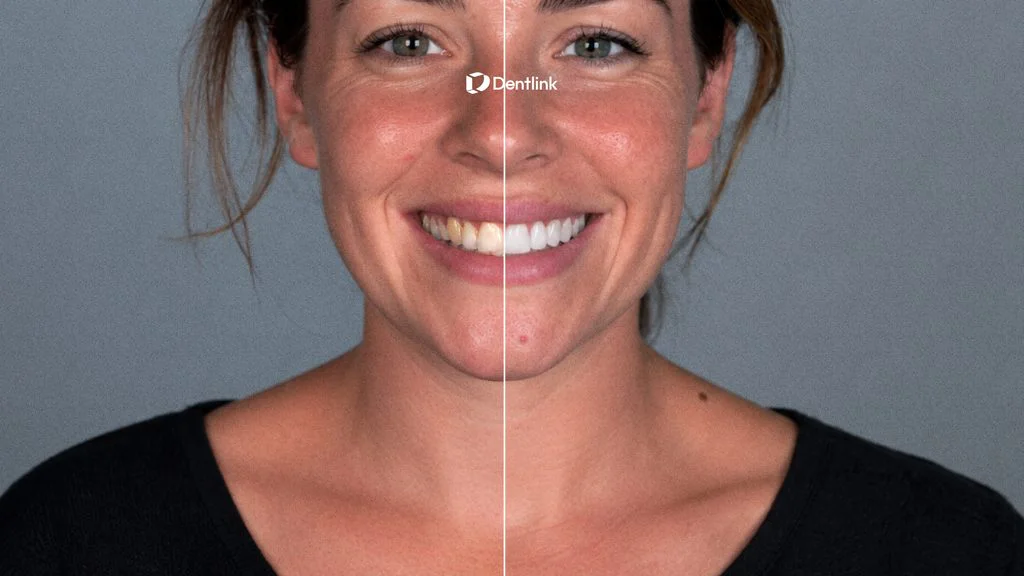
In a cosmetic dentistry consultation, patients often know they want a change—but they may struggle to explain exactly what they want. A smile simulation for dentists makes that conversation more visual. Instead of relying only on descriptions, reference photos, or imagination, the dentist and patient can begin with a personalized preview of the patient’s potential new smile.
That is the idea behind ISV — Insta Smile Vision. One patient photo goes in, and a new smile preview comes out. The result gives patients a clearer starting point for exploring their preferences before the next consultation.
One photo in. A new smile out.
Why Cosmetic Dental Consultations Can Be Difficult
Terms such as tooth length, proportion, shade, symmetry, and smile line may be familiar to a dentist, but they can feel abstract to a patient. Even when a patient brings inspiration photos, those images show someone else’s face—not how a proposed smile may look on their own.
This can create a gap between what the dentist explains and what the patient imagines. The patient may like the idea of cosmetic treatment but still find it difficult to picture the outcome or communicate personal preferences.
A dental smile simulation helps bridge that gap. It gives both sides something specific to look at, discuss, and refine together.
What Is ISV — Insta Smile Vision?
ISV is Dentlink’s smile-preview solution for cosmetic consultations. Using a patient photo, ISV creates a personalized visual representation of a potential new smile.
The preview is not a final treatment plan or a guarantee of the clinical result. It is a communication tool designed to help patients explore possibilities and help dentists guide the conversation more clearly.
These reactions give the dentist a better understanding of what the patient notices, values, and expects.
How Smile Simulation for Dentists Supports a Better Consultation
1. It makes the conversation visual
Patients do not need to understand every clinical term to respond to an image. A personalized smile preview makes it easier for them to point out what they like and what they would prefer to adjust.
2. It helps uncover patient preferences earlier
“Natural” or “bright” can mean something different to every patient. A smile simulation gives the dentist an opportunity to identify those differences before moving further into case planning.
3. It creates a more engaging patient experience
Seeing a possible new smile on their own face can make a cosmetic dentistry consultation feel more personal and relevant. The patient becomes an active participant in the discussion rather than simply listening to a description of treatment.
4. It provides a clearer starting point
The preview helps organize the initial conversation around visible preferences. The dentist can then connect those preferences with clinical findings, realistic treatment options, limitations, timing, and next steps.
A Simple Workflow for Dentists
A smile simulation for dentists should be simple to introduce without adding unnecessary steps to the consultation. ISV is designed to fit naturally into the cosmetic consultation process.
Step 1: Start with one patient photo
Use a clear frontal photo that shows the patient’s smile. Consistent framing and lighting can help create a more useful visual reference.
Step 2: Create the smile preview
Submit the photo through the ISV workflow to receive a personalized smile visualization.
Step 3: Review it with the patient
Ask what the patient notices first. Rather than presenting the image as a fixed result, use it to explore preferences around shape, length, proportion, shade, and overall character.
Step 4: Connect the vision to clinical reality
Use the patient’s feedback as a starting point for a professional assessment. Explain which elements may be achievable, what treatment options may be considered, and what additional records or diagnostics are needed.
The value of a smile simulation for dentists depends on the conversation around it. The following questions can help clinicians gather more useful and specific patient feedback:
What is the first change you notice?
Does this feel natural for you?
Do you prefer a softer or more defined tooth shape?
How do you feel about the length and proportions?
Would you prefer a brighter or more subtle shade?
Is there anything you would want to change in this preview?
Open-ended questions help patients explain their reactions in their own words. That insight can be more useful than simply asking, “Do you like it?”
A Preview Is a Conversation Tool, Not a Promise
A smile simulation for dentists should always be presented with the right context. The image helps a patient visualize a direction, but it does not replace a clinical examination, diagnostic records, treatment planning, or informed consent.
Actual outcomes depend on the patient’s oral condition, anatomy, selected treatment, materials, and other clinical factors. Setting this expectation clearly allows the preview to do what it does best: support a more productive conversation.
Patients may not always have the words to describe their ideal smile. Give them something they can see and respond to.
By making patient preferences easier to see and discuss, a smile simulation for dentists can create a clearer starting point for cosmetic treatment conversations.
With ISV — Insta Smile Vision, one patient photo becomes a personalized smile preview that can help you explore preferences, explain possibilities, and begin the cosmetic consultation with greater clarity.
Your patient picks their new smile. Try ISV before your next cosmetic consultation.